
 Close
Close









Solution
By connecting to a Wi-Fi network or other device supporting this camera’s wireless functions, you can perform tasks such as sending images or controlling the camera.
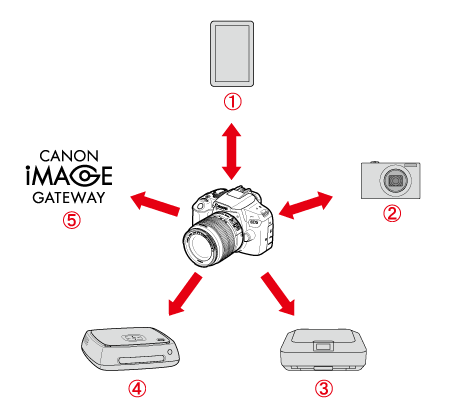


Connect the camera to a smartphone or tablet wirelessly and use the dedicated application "Camera Connect" to operate the camera remotely or view images stored in the camera.
In this article, "Smartphone" refers to smartphones and tablets.


Transfer images between Canon cameras with built-in wireless functions.
*Firmware version 1.1.0 or later is required.


Connect the camera to a wireless printer supporting PictBridge (Wireless LAN) to print images.
*Firmware version 1.1.0 or later is required.

Connect the camera to Connect Station (sold separately) wirelessly to save images.
* Use the latest firmware.


Share images with family and friends or share images using a range of Web services via CANON iMAGE GATEWAY, an online photo service for Canon users (free registration required).
Caution
CANON iMAGE GATEWAY Web services are not supported in certain countries and areas.
Caution
This camera supports NFC, which enables you to set up a connection between the camera and a smartphone or Connect Station (sold separately) easily.
⋖What is NFC?⋗
NFC (Near Field Communication) is a function that can exchange information by simply bringing two NFC-enabled devices close together. This camera uses the NFC function to exchange information regarding wireless connections.
⋖What You Can Do Using the NFC Function⋗
You can use this camera's NFC function to do the following:
For details, refer to the instruction manual included with the camera.
*This camera cannot be connected to other NFC-enabled cameras or printers using the NFC function.
*A connection cannot be established using the NFC function while shooting with the camera or when the Mode Dial is set to ⋖ 
*To connect the camera to a smartphone using the NFC function, the smartphone's Wi-Fi and NFC functions must be enabled.
Caution
The Wi-Fi CERTIFIED logo and the Wi-Fi Protected Setup mark are trademarks of the Wi-Fi Alliance.