
 Close
Close










Solution
When slow motion recording is activated, the camcorder records using a progressive frame rate (shooting frame rate) that is different from the playback frame rate. Recording a clip at a higher frame rate than the [Frame Rate] setting will result in a slow motion effect during playback (up to 1/5 of the original speed).
Sound is not recorded when slow motion recording is activated. Also, the maximum recording time of a single clip is the equivalent of approximately 6 hours of playback time.
Slow motion recording is available only for XF-HEVC clips.
Available shooting frame rates and maximum recording time
| Video configuration | Shooting frame rate | Approx. maximum recording time for a single clip | |
| Frame rate* | Resolution/Color sampling | ||
| 59.94P | 1920x1080, YCbCr 4:2:2, 10 bit | 119.88P | 3 hr. |
| 29.97P | 1 hr. 30 min. | ||
| 23.98P | 1 hr. 12 min. | ||
| 50.00P | 100.00P | 3 hr. | |
| 25.00P | 1 hr. 30 min. | ||
| * For clips recorded with the frame rate set to 23.98P, the playback bit rate will be 35 Mbps; for clips recorded with other frame rates, it will be 45 Mbps. | |||
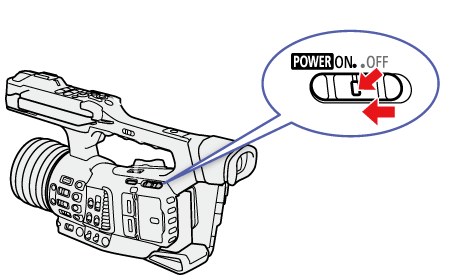
1. Press and hold the button on the POWER switch and set the switch to ON.
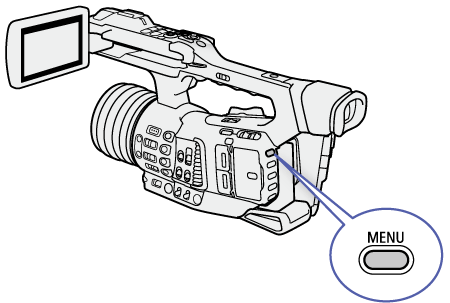
2. Press the MENU button.
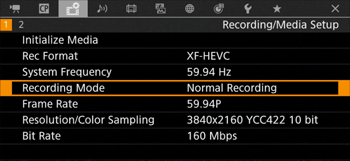
3. Select [Recording Mode].


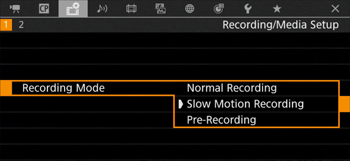
4. Select [Slow Motion Recording] and then press SET.
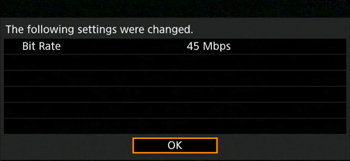
5. The message [The following settings were changed] will appear. Review the changes made automatically and press SET.
6. Press the MENU button to close the menu.
Caution
When you have finished recording, turn off the special recording mode.
Repeat steps 3 and 4 selecting [Normal Recording] instead.
Caution
[About the time code when slow motion recording is activated]
- The time code mode can be set to [Regen.], or to [Preset] with [Rec Run] running mode.
- If the time code running mode was set to [Free Run], the time code running mode will be changed automatically to [Rec Run] when slow motion recording is activated.
- When the special recording mode is turned off, the time code running mode will return to its previous setting.