
 Close
Close









Solution
Loading Paper in the Stack Bypass TrayBefore Inserting Paper
Printing on the Back Side of Preprinted Paper
Loading Envelopes
Loading Paper in the Stack Bypass Tray
If you are making prints on transparencies, labels, nonstandard-sized paper, or envelopes, load them into the stack bypass tray.
Caution
- Paper Quantity: one to approximately 100 sheets (80 g/m2).
- Paper Size: 76.2 x 127 mm to 216 x 356 mm
- Paper Weight: 60 to 176 g/m2
- Paper which has been rolled or curled must be straightened out prior to use, to allow the paper to feed smoothly through the stack bypass tray (allowable curl amount: less than 10 mm for normal paper, less than 5 mm for heavyweight paper).
- Depending on the paper storage conditions, it may not be possible to feed some paper into the stack
bypass tray. In this case, set the amount of paper to less than 50 sheets (80 g/m2).
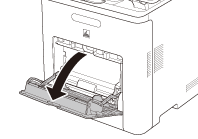
1. Open the stack bypass tray.
Caution
If the paper size you are going to load into the stack bypass tray is different from the paper size stored in the stack bypass tray Standard Settings, set the stack bypass tray Standard Settings to 'Off' in Common Settings (from the Additional Functions screen).
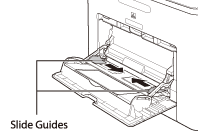
2. Adjust the slide guides to match the size of the paper.
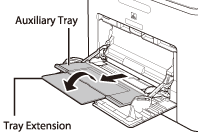
If you are feeding large size paper, pull out the auxiliary tray, and extend the tray extension.
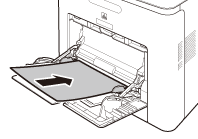
3. Load the paper into the stack bypass tray.
Insert the paper stack as far as it will go.
4. Specify the size and type of the paper loaded.
Caution
If ⋖Stack Bypass Paper (Std.)⋗ in ⋖Paper Settings⋗ is set to ⋖On⋗, you can load only the specified size and type of paper.
Before Inserting Paper
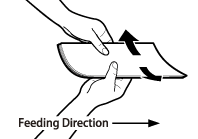
1. When you use the stack bypass tray to make copies, straighten out curled paper prior to use, as shown below. Curled paper may cause a paper jam.
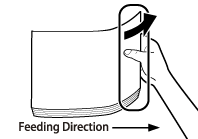
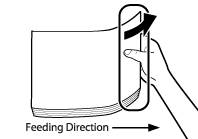
2. If there is difficulty in straightening out curled paper, curl the front edges of the paper upward, as shown below.
Printing on the Back Side of Preprinted Paper
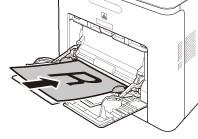
1. Load the preprinted paper face up into the stack bypass tray, as shown in the illustration below.
The screen for selecting the paper size appears.
Caution
Caution
Loading Envelopes
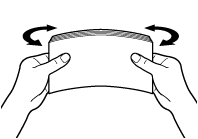
1. Take five envelopes, loosen them as shown, and then stack them together. Repeat this step five times for each set of five envelopes.
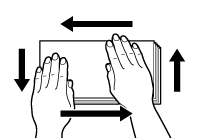
2. Place the envelopes on a clean, level surface, and press all the way around the envelopes by hand, in the direction of the arrows, to remove any curls. Repeat this step five times for each set of five envelopes.
Caution
Take particular care to spread the envelopes out in the direction that they will be fed.
3. Hold down the four corners of the envelopes firmly, so that they and the sealed or glued portion stay flat.
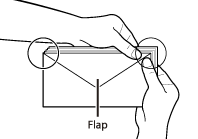
Caution
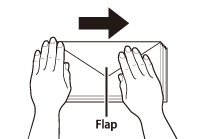
Load the envelopes, as shown below.
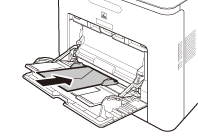
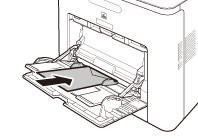
The screen for selecting the paper size appears.
Caution