







Canon Group
Close Close
Menu Menu Close Close Search
IXUS 125 HS Support
FAQs & troubleshooting

How to set Continuous Shooting

Content Id: 8201443800


Solution

You can shoot continuously while the ⋖shutter button⋗ is pressed fully and held.

The number of shots that can be taken in 1 second is as shown in the table below.

ModelRecordable Shots ( / sec.)
PowerShot ELPH 110 HS / IXUS 125 HSApprox. 2.0 shots
PowerShot D20Approx. 1.9 shots

Caution

The following explanations are provided based on the assumption that the [Shooting Mode] is set to [Program] ().
Cannot be used with the self-timer or [Blink Detection].
During continuous shooting, focus and exposure are locked at the position/level determined when you pressed the shutter button halfway.
Shooting may stop momentarily or continuous shooting may slow down depending on shooting conditions, camera settings, and the zoom position.
As more shots are taken, shooting may slow down.
Shooting may slow down if the flash fires.
In the following shooting modes, you cannot set the [Continuous] ().

- [AUTO] (), [Movie Digest] (), [Smart Shutter] (), [Handheld NightScene] (), [Long Shutter] (), [Stitch Assist] (), [iFrame Movie] (), [Super Slow Motion Movie] ()

1. Press the ⋖Power⋗ button.


2. Press the ⋖FUNC./SET⋗ () button.


3. The following screen appears on the LCD monitor.
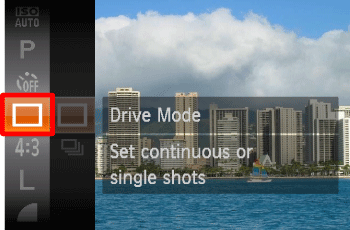
Operate the ⋖directional buttons⋗ up or down to select the [Drive Mode] ().

After the selection is made, press the ⋖FUNC./SET⋗ button ().


4. The following screen appears on the LCD monitor.
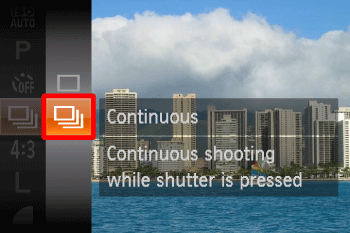
Operate the ⋖directional buttons⋗ up or down to select the [Continuous] ().

After the selection is made, press the ⋖FUNC./SET⋗ button ().


5. The following screen appears on the LCD monitor.
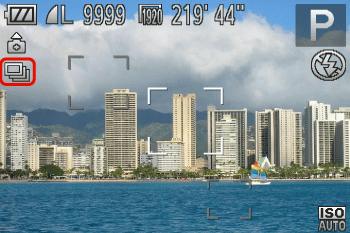
If the [Continuous] () icon is displayed on the upper-left part of the screen, the setting is completed.

As long as you hold the ⋖shutter button⋗ down, the camera will shoot successive images.

Caution

If using the PowerShot ELPH 110 HS / IXUS 125 HS, when shooting with Face ID set to [Continuous] (), the location in the image where the name is recorded will be determined in the first shot, and will be recorded in the same place for further shots.

"Was this helpful?"