
 Close
Close









Solution
Check the lens's focus mode switch.Clean the lens and camera contacts.
Attach the lens securely.
Check the Custom Function [C.Fn IV: Operation/Others C.Fn-8 Shutter/AE lock button] settings.
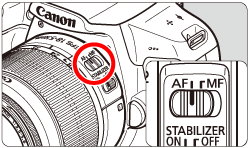
Check the lens's focus mode switch.
Autofocus will not operate if the lens's focus mode switch is set to ⋖MF⋗.
Refer to the following figure, and set the focus mode switch to ⋖AF⋗.
Clean the lens and camera contacts.
The transmission of information between camera and lens takes place between the camera contact ( 

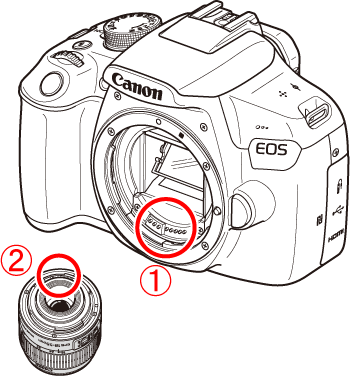
If the lens contact and camera contact are dirty, transmission will not occur normally and autofocus might not operate correctly.
If the lens and camera contacts are dirty, wipe them with a clean, dry cloth, being careful to not scratch the contacts.
Caution
Cautions when Cleaning the Contacts
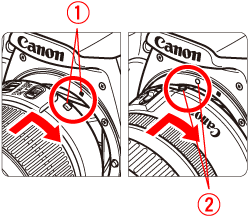
Attach the lens securely.
Information is shared in both directions between the camera and lens. Therefore, if the lens is not attached securely, autofocus might not operate correctly.
Refer to the figure below to attach the lens securely.
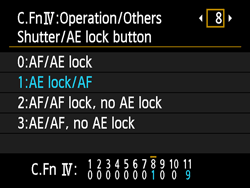
Check the Custom Function [C.Fn IV: Operation/Others C.Fn-8 Shutter/AE lock button] settings.
If autofocus does not operate when the shutter button is pressed halfway, the custom function settings might have been changed as shown below.
In the following figure, "AE is locked (exposure is locked) when the shutter button is pressed halfway" is set.
In the following figure, "AE (Metering) starts when the shutter button is pressed halfway" is set.
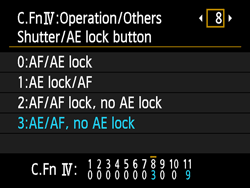
In this case, change the value to something other than "1" or "3".
For details about how to change set values, refer to the instruction manual included with the camera.
If you are unable to make an improvement after checking these settings, contact a Canon customer service center for assistance.
If a malfunction occurs when using a non-Canon lens, contact the lens manufacturer for assistance.