Solution
If printed ruled lines are misaligned or print results are otherwise unsatisfactory, adjust the print head position.
You need to prepare: a sheet of A4 or Letter-sized Canon Matte Photo Paper MP-101
Caution
If the remaining ink level is low, the print head alignment pattern will not be printed correctly. Replace the ink tank whose ink is low.
See [ Replacing an Ink Tank ]
The print head alignment pattern is printed in black and blue.
If you run out of the supplied paper (Canon Matte Photo Paper MP-101) or the specified Canon genuine paper is not immediately available or obtainable, you can use plain paper and align the Print Head manually.
1. Make sure that the power is turned on.
2. Load a sheet of supplied paper or A4 or Letter-sized Canon Matte Photo Paper MP-101 in the Rear Tray.
Load the paper with the print side (whiter side) facing you in the Rear Tray.
Caution
You cannot use the Cassette to align the Print Head automatically. Be sure to load paper in the Rear Tray.
3. Open the Paper Output Tray gently, and open the Output Tray Extension.
Caution
If the Inner Cover is open, close it.
4. Print the print head alignment pattern.
(1) Select Settings  on the HOME screen, and press the OK button.
The Settings screen will appear.
(2) Select Maintenance  , and press the OK button.
The Maintenance screen will appear.
(3) Select Auto head align, and press the OK button.
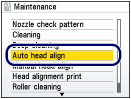
The confirmation screen will appear.
(4) Select Yes, and press the OK button.
The print head alignment pattern will be printed and the print head position will be adjusted automatically.
This takes about 7 minutes.
Caution
Press the HOME button to exit the Settings menu and display the HOME screen.
If the automatic adjustment of the print head position has failed, the error message "Auto head align has failed." appears on the LCD. For details, refer to [
An Error Message Is Displayed on the LCD ]
If the print results are still not satisfactory after adjusting the print head position as described above, adjust the print head position manually.

 Close
Close









