
 Close
Close









Solution
Types of Multiple Exposure Control (Merging Images)Shooting Multiple Exposures
Checking and Deleting Multiple Exposures During Shooting
You can shoot two to nine exposures to be merged into one image. This method is called shooting multiple exposures.
With Live View shooting, you can see in real time how the exposures are merged when you shoot multiple-exposure images. For details on how to use Live View shooting, refer to the related information.
Caution
Icons in this Article
[ 


Caution
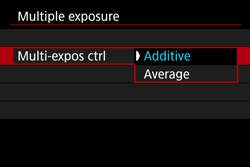
Types of Multiple Exposure Control (Merging Images)
| Operation | Description |
| Additive | The exposure of each single image captured is added cumulatively. Based on the [No. of exposures], set a negative exposure compensation. Refer to the basic guide below to set the exposure compensation amount. Exposure Compensation Setting Guide for Multiple Exposures: Two exposures: -1 stop, three exposures: -1.5 stop, four exposures: -2 stops |
| Based on the [No. of exposures], negative exposure compensation is set automatically as you shoot multiple exposures. If you shoot multiple exposures of the same scene, the exposure of the subject's background will be automatically controlled to obtain the standard exposure. |
Caution
The noise, irregular colors, banding, etc. of the image displayed during shooting with [Additive] set may be different from the final multiple-exposure image recorded.
Shooting Multiple Exposures
1. Set the camera's power switch to ⋖ON⋗.
2. Press the ⋖MENU⋗ button to display the menu.
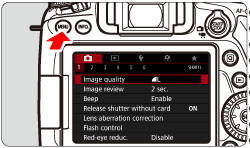
3. Under the [ 
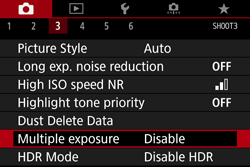
4. The Multiple exposure screen will appear.
5. Set [Multiple exposure].
⋗ button.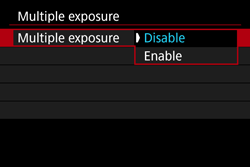
6. Set [Multi-expos ctrl].
Select the desired multiple-exposure control method, then press ⋖
7. Set the [No. of exposures].
⋗ ⋖ ⋗ keys to select the number of exposures, then press the ⋖ ⋗ button.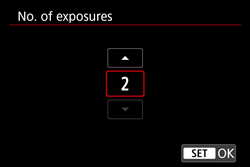
8. Set [Continue Mult-exp].
⋗ button.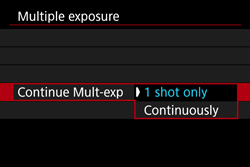
9. Take the first exposure.
The captured image will be displayed.
-The ⋖
 ⋗ button enables you to view the captured image.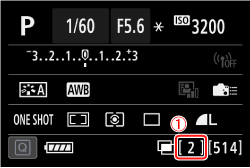

10. Shoot subsequent exposures.
The merged multiple-exposure image will be displayed.
With Live View shooting, the multiple-exposure images merged so far will be displayed. By pressing the ⋖INFO.⋗ button, you can display only the Live View image.
Caution
 : Lens aberration correction ], [
  : Auto Lighting Optimizer], and [ : Highlight tone priority ] will be automatically switched to [Disable].: Picture Style ] is set to [Auto], [Standard] will be applied for shooting.⋗ button to view the multiple exposures taken so far or delete the last single exposure.
Checking and Deleting Multiple Exposures During Shooting
Before you finish shooting the set number of exposures, you can press the ⋖
If you press the ⋖
| Operation | Description |
 Undo last image Undo last image | Deletes the last image you shot. The number of remaining exposures will increase by 1. |
 Save and exit Save and exit | The images shot so far will be merged and saved as a multiple-exposure image. |
 Exit without saving Exit without saving | Multiple-exposure shooting will exit without saving the images shot. |
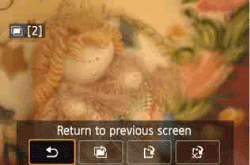
 Return to previous screen Return to previous screen | The screen before you pressed the < > button will reappear. |
Caution
During multiple-exposure shooting, playback other than multiple-exposure images is not possible.