
 Close
Close









Issue
An error message appears and the scanner does not work.
Cause and solution
The lock switch holding the scanning unit is not released completely.
Disconnect the interface cable from the scanner and release the lock switch completely.
Then reconnect the scanner.
Make sure that the lock switch is released.
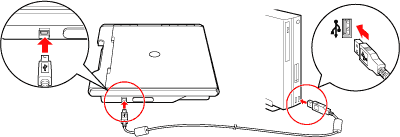
Connect the scanner to the computer with the supplied USB cable.
The connectors of USB cable have different shapes. Connect the wide flat connector of the USB cable to the computer, the small square one to the scanner.
Caution
Only use the USB cable provided with the scanner. Use of other cables may lead to a malfunction.
Caution
Make sure to release the lock before connecting the scanner to the computer. If you use the scanner without releasing the lock, it may cause failure or trouble.
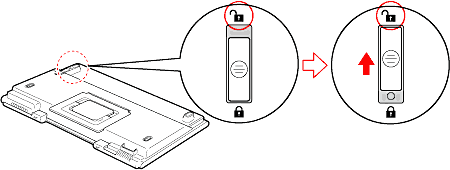
1. Disconnect the USB cable from the scanner.
2. Turn the scanner upside down.
3. Slide the lock switch on the bottom of the scanner toward the unlock mark to release the lock.
Caution
When carrying or transporting the scanner, make sure to lock the scanner by sliding the lock switch to the lock mark to lock the scanning unit.
Cause and solution
The error message appears even though the lock switch is released.
If the error message appears even though the lock switch is released, the main unit may not function properly. Contact the store where you purchased the scanner or the service information desk.