Solution
Raise the [ISO speed] to use a fast shutter speed when you wish to reduce the effects of camera shake or avoid blurry subjects, or to turn the flash off when shooting in a dark area.
Caution
As the actual locations of buttons / switches on cameras vary depending on the camera model, the illustrations that appear on this page may differ from your camera.
Screens or menu listings may differ depending on the camera model being used.
The following explanations are provided based on the assumption that the [Shooting Mode] is set to [Program AE] (

).
To set the [ISO Speed], it is necessary to set the [Shooting Mode] to one of the following modes.
- [Program AE] (), [Long Shutter] ( ), [Digital Macro] (
 )
)
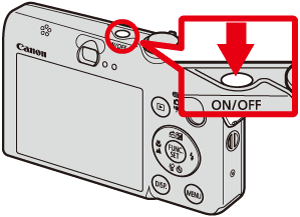
1. Press the ⋖Power⋗ button on the camera.
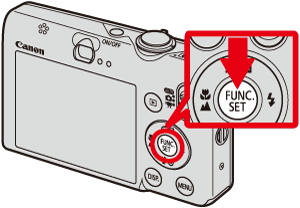
2. Press the ⋖FUNC./SET⋗ ( ) botton.
3. The following screen appears on the LCD monitor.
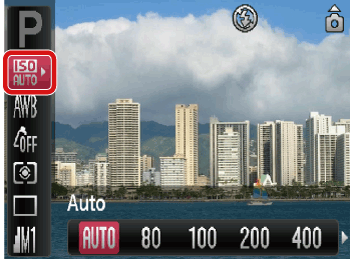
Operate the ⋖Directional buttons⋗ up and down to select [Auto] ( ).
).
4. Select the [ISO Speed].
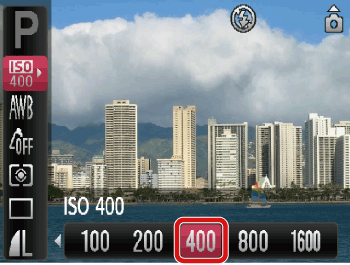
Operate the ⋖Directional buttons⋗ right and left to select the [ISO Speed]*.
After the settings are completed, press the ⋖FUNC./SET⋗ () button.
* The appropriate [ISO Speed] differs depending on shooting locations. If the camera shake warning icon ( ) appears when you press the ⋖Shutter Button⋗ halfway, it is recommended to gradually raise the ISO speed in increments such as [ISO 80], [ISO 100], etc., and then set the [ISO Speed] when the camera shake warning icon () disappears.
5. If the following icon is shown, the setting is complete (if setting [ISO Speed] to 400).
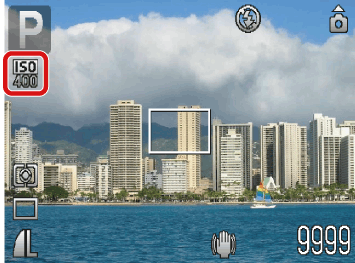
Caution
Raising the [ISO Speed] results in a faster shutter speed. Therefore, you can shoot images with less subject blur and camera shake.
However, the higher the [ISO Speed], the more the noise stands out (more uneven areas in an image).
Caution
With [ISO 3200], you can set an even faster speed.
How to set [ISO 3200]: Select [Program] ( ) in Step 3. Next, operate the ⋖Directional buttons⋗ right and left to select [ISO 3200] (
 ) among items displayed in the lower part of the LCD monitor.
When the camera is set to [ISO 3200], Recording pixels are set to (

) (1600 x 1200 pixels).
When the camera is set to [ISO 3200], noise may stand out.

 Close
Close









