
 Close
Close









What You Can Do Using the Wireless LAN (Wi-Fi) Functions
This camera’s wireless LAN functions let you perform a range of tasks wirelessly, from sending images to Web services and other cameras to controlling the camera remotely, simply by connecting to a Wi-Fi network or other device supporting this camera’s wireless LAN functions.
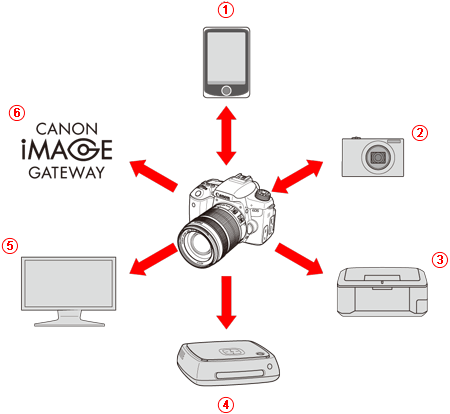
 |  Connect to a smartphone Connect to a smartphone | View saved images or operate the camera from a Wi-Fi-enabled smartphone or tablet. Install the dedicated application "Camera Connect" to use these functions. "Smartphone" refers to smartphones and tablets. |
|---|---|---|
 |  Transfer images between cameras Transfer images between cameras | Transfer images between this camera and other Canon cameras with built-in wireless LAN functions. |
 |  Print images using a Wi-Fi printer Print images using a Wi-Fi printer | Connect the camera to a wireless LAN compatible printer supporting PictBridge (Wireless LAN) to print images wirelessly. |
 | Save images to Connect Station | Connect the camera to Connect Station (sold separately) via a wireless LAN to save images. |
 |  View images using a media player View images using a media player | View images on the camera’s memory card on your TV set, by using a media player supporting DLNA* via a wireless LAN. * Digital Living Network Alliance |
 |  Send images to a Web service Send images to a Web service | Share images with family and friends or share images using a range of Web services via CANON iMAGE GATEWAY, an online photo service for Canon users (free registration required). |
Caution
・CANON iMAGE GATEWAY Web services are not supported in certain countries and areas. For information on countries and areas supporting CANON iMAGE GATEWAY services, refer to the Canon Web site (http://www.canon.com/cig).
・Settings for "Send images to a Web service" may not be performed from a computer in certain countries and areas.
Caution
This camera supports NFC which enables you to set up a connection between the camera and a smartphone or Connect Station (sold separately) easily.
What is NFC?
- NFC (Near Field Communication) is a function that can exchange information by simply bringing two NFC-enabled devices close together. This camera uses the NFC function to exchange information regarding wireless LAN connection.
What You Can Do Using the NFC Function
-Using the camera’s NFC function enables you to do the following:
For more information, please refer to the camera’s instruction manuals.
* With this camera, you cannot connect to other NFC-enabled cameras or printers using the NFC function.
Wi-Fi Function Flowchart
Wireless LAN Function Flowchart (Easy Connection)
| Smartphone | Camera |  Printer Printer | Connect Station | |
|---|---|---|---|---|
| Set up | Register the camera’s nickname | |||
 | | | | |
| Install Camera Connect on a smartphone | Set up a compatible camera | Set up a compatible printer | Set up Connect Station | |
| Connect | | | | |
| Register connection destinations to the camera | Connect via NFC | |||
| | | | |
| Use | Make images viewable and shoot remotely | Exchange images | Print images | Save images |
Wireless LAN Function Flowchart (Advanced Connection)
| Smartphone | Printer | Media player | Web service | |
|---|---|---|---|---|
| Set up | Register a nickname | |||
| | | | |
| Install Camera Connect on a smartphone | | | ・Register with CANON iMAGE GATEWAY ・Register Web services on the camera | |
| | | ||
| Connect each device to a Wi-Fi access point* | ||||
| Connect | | | | |
| Connect the camera to a Wi-Fi access point | ||||
| | | | |
| Connect the camera to each device | | | ||
| | | | |
| Use | Make images viewable and shoot remotely | Print images | View images | Save and share images |
Caution
・Wi-Fi is a registered trademark of the Wi-Fi Alliance.