
 Close
Close









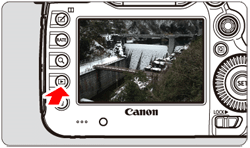
Displaying the Shooting Information
1. Set the camera's power switch to [ON].
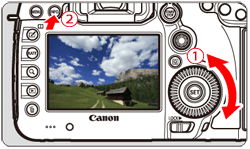
2. Press the [ 
3. Turn the [ 


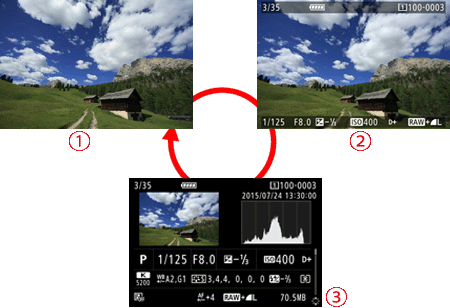
4. Each time you press the [INFO] button, the information display will change.


Caution
When you play back RAW images shot with the [ 
Caution
[Shooting Information Display]
With the shooting information screen displayed, you can tilt [ 
Detailed information 
Detailed shooting information is shown below
[Sample Still Photo Taken in a Creative Zone Mode (Detailed information)]
| Shooting mode/Multiple exposure |  | File size |
| Shutter speed |  | Flash exposure compensation amount/HDR shooting/ Multi Shot Noise Reduction |
 | Aperture |  | Crop |
 | Exposure compensation amount |  | Image-recording quality/ Edited images/Cropping |
 | Histogram (Brightness/RGB) |  | Picture Style/Settings |
 | Shooting date and time |  | AF Microadjustment |
 | ISO speed |  | White balance correction/ Correction amount |
 | Scroll bar |  | Auto Lighting Optimizer |
 | Highlight tone priority |  | White balance |
 | Metering mode | ||
* Lines indicating the shooting area will be displayed for images taken with the crop/aspect ratio set and with RAW or RAW+JPEG set for image quality.
* Lines indicating the shooting area will be displayed for images with cropping information appended.
* During flash photography without flash exposure compensation, [
 ] will be displayed.
* [
 ] and the dynamic range adjustment amount will be displayed for images shot with HDR shooting.
* [
 ] will be displayed for multiple-exposure photos.
* [
 ] will be displayed for images shot with Multi Shot Noise Reduction.
* For still photos taken during movie shooting, [
 ] will be displayed.
* For images that are processed (RAW processing function, resized, or cropped) and then saved, [
 ] will be displayed.
* For images cropped and then saved, [
 ] will be displayed.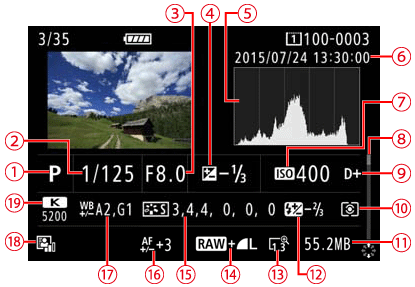
Caution